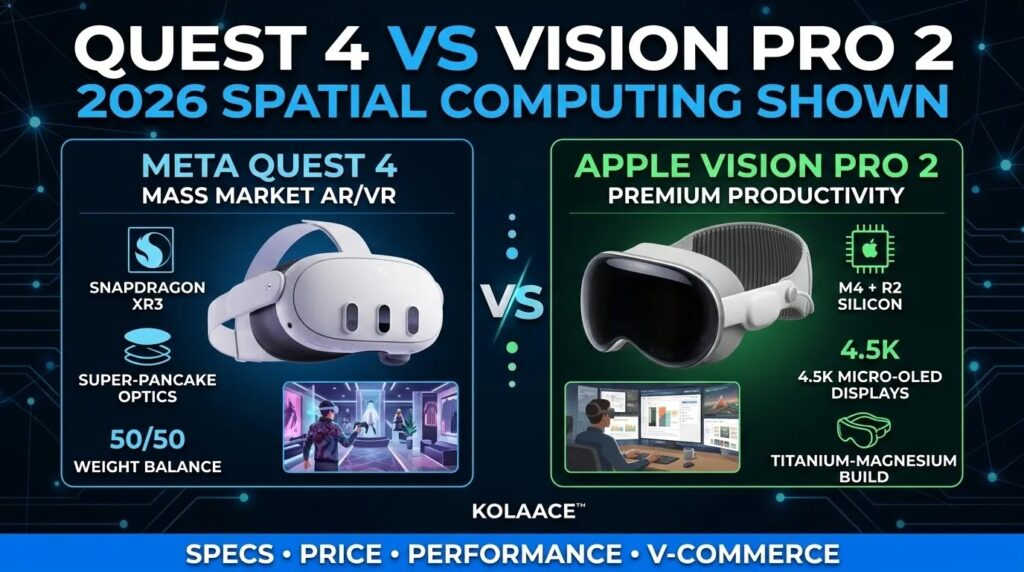
If you are planning to invest in a spatial computing headset in 2026, the biggest confusion is simple. Should you go for a powerful premium device or a practical everyday headset? This is exactly where most buyers get stuck.
Devices like Meta Quest 4 and Apple Vision Pro 2 are no longer just gadgets for gaming or tech enthusiasts. They are slowly replacing laptops, monitors, and even office setups for many users. From virtual meetings to digital product design, these headsets are becoming real productivity tools.
This detailed comparison is designed to help you make a clear decision based on real usage, not just specifications. Whether you are a student, business owner, or content creator, this guide will show what actually matters in daily use.
Quick Comparison: Key Specifications 2026
Before going deep, it is important to understand the core hardware differences. These directly impact performance, comfort, and long-term usability.
| Feature | Meta Quest 4 | Apple Vision Pro 2 |
|---|---|---|
| Display Technology | 3.2K per eye pancake optics | 4.5K Micro OLED dual display |
| Processor | Snapdragon XR3 Gen 2 | Apple M4 with R2 chip |
| Weight | 510g balanced design | 440g premium alloy body |
| Tracking | Hand tracking and inside out sensors | LiDAR and OpticID tracking |
| Price | Affordable range | Premium pricing segment |
What Actually Matters in Real Use
Specs look impressive on paper, but real experience is different. After analyzing usage patterns across professionals and casual users, three factors matter the most.
- Comfort for long sessions, especially for work
- Display clarity, for reading and design
- Ecosystem support, apps and integrations
This is where the difference between these two devices becomes very clear.
Step by Step: Choosing the Right Headset
Step 1: Define Your Primary Use
If your main goal is gaming, social interaction, or entertainment, Quest 4 is more practical. If your goal is productivity, design, or replacing a workstation, Vision Pro 2 is more suitable.
Step 2: Consider Your Daily Usage Time
For short sessions, both work fine. For 5 to 8 hour usage, Vision Pro 2 performs better due to clarity and ecosystem support.
Step 3: Budget Decision
This is often the deciding factor. Quest 4 offers strong value for money, while Vision Pro 2 is an investment for professionals.
Real World Use Cases
For Small Businesses
Many small manufacturing and retail businesses are using spatial devices for layout planning and product visualization. Quest 4 is often used here because it is affordable and easy to deploy across teams.
For Content Creators
Vision Pro 2 provides a major advantage in editing and multi screen workflows. Creators can open multiple virtual displays, edit videos, and manage workflows without a physical setup.
For Students and Learners
Quest 4 works better due to cost and flexibility. It supports learning apps, virtual labs, and interactive content without requiring a heavy investment.
For Remote Work
Vision Pro 2 acts like a complete virtual office. Professionals can attend meetings, manage tasks, and work on documents with high precision.
Pros and Cons
Meta Quest 4
- Pros: Affordable, lightweight balance, strong gaming ecosystem, easy setup
- Cons: Lower display clarity compared to premium devices, limited professional tools
Apple Vision Pro 2
- Pros: Exceptional display quality, powerful processing, ideal for work and design
- Cons: High cost, limited outside Apple ecosystem, not focused on gaming
Who Should Use and Who Should Avoid
Choose Quest 4 if:
- You want value for money
- You enjoy gaming and social VR
- You are new to spatial computing
Choose Vision Pro 2 if:
- You need a professional workspace
- You work in design, coding, or media
- You are already in Apple ecosystem
Avoid both if:
- You only need basic mobile or laptop tasks
- You are not comfortable wearing headsets for long durations
Best Practices Before Buying
- Always test headset comfort before purchase if possible
- Check app ecosystem relevant to your work
- Plan for accessories like battery packs or controllers
- Ensure compatibility with your existing devices
Final Takeaway
There is no single winner in this comparison. The right choice depends on how you plan to use the device daily.
Meta Quest 4 is a smart entry point into spatial computing. Apple Vision Pro 2 is a powerful tool for professionals who want to replace traditional setups.
If your goal is exploration and flexibility, go with Quest. If your goal is productivity and precision, Vision Pro is the better investment.
FAQ