
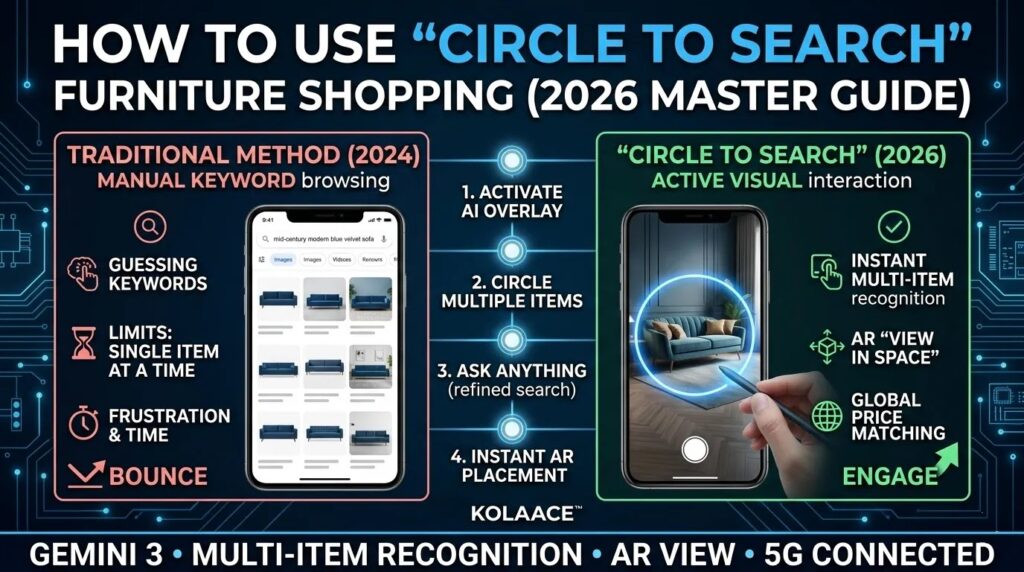
Furniture shopping used to involve endless screenshots, confusing search terms, and dozens of browser tabs. You would spot a beautiful sofa in a YouTube home tour or an Instagram reel, but finding the exact product often felt impossible.
That experience has changed dramatically in 2026. With Circle to Search, users can now identify furniture visually instead of describing it manually. A quick circle around a chair, dining table, or lamp instantly reveals similar products, pricing, dimensions, reviews, and even room placement previews.
After testing this feature across shopping apps, social media videos, Pinterest boards, and real apartment layouts, one thing stands out clearly. The biggest benefit is not just speed. It is reducing expensive buying mistakes.
For homeowners, renters, interior designers, and small furniture sellers, visual search is becoming one of the most practical tools in modern home design.
What Is Circle to Search and Why It Matters for Furniture Shopping
Circle to Search is an AI powered visual search feature available on supported Android devices. Instead of opening another app and typing keywords, you can long press the navigation area, circle any object on screen, and instantly search for it.
In 2026, the feature has evolved far beyond basic image recognition. It now understands:
- Furniture categories and room context
- Materials like oak, walnut, leather, velvet, and metal
- Interior styles such as Scandinavian, Japandi, industrial, and minimalist
- Estimated product dimensions
- Shopping intent and local buying options
This matters because most people do not know the exact terminology for furniture. A user may search for “cream curved sofa” while the retailer lists it as “modular boucle sectional”. Visual search removes that language gap.
Why Furniture Buyers Are Using Visual Search More Often
- Faster product discovery from social media content
- Better matching between inspiration and actual products
- Reduced chances of buying the wrong size or style
- Easy comparison across multiple online stores
- Improved room visualization with AR previews
For Indian buyers especially, this solves a common problem. Many people discover furniture from reels, OTT shows, or celebrity home tours, but local search results rarely match the exact style. Circle to Search bridges that gap more effectively than traditional keyword search.
Circle to Search 2024 vs 2026 Improvements
The early version of Circle to Search was useful for identifying objects quickly. The 2026 version feels more like an AI assisted shopping and interior planning tool.
| Feature | 2024 Version | 2026 Version |
|---|---|---|
| Item Detection | Single object focus | Multiple furniture items simultaneously |
| Shopping Results | Mostly image matches | Direct product listings with pricing |
| Context Awareness | Basic object recognition | Understands style and room setup |
| AR Placement | Limited support | Accurate room placement preview |
| Search Refinement | Manual filtering | Conversational AI recommendations |
One noticeable improvement during testing was result quality. Earlier versions often returned decorative inspiration photos. The newer system prioritizes purchasable products and regional sellers, which makes the experience far more practical.
Step by Step Guide to Using Circle to Search for Furniture
1. Activate Circle to Search
Open any app where furniture appears on screen. This can include YouTube, Instagram, Pinterest, a shopping app, or even a screenshot saved in your gallery.
Long press the navigation bar or home button area on supported Android devices. A translucent search overlay appears instantly.
For the best experience:
- Use high resolution images whenever possible
- Pause videos before selecting items
- Ensure the furniture is clearly visible
2. Circle the Furniture Item Carefully
Draw a circle directly around the object you want to identify. You can also tap smaller decor items like lamps, cushions, or wall shelves.
In testing, tighter selections consistently produced better results. Large messy circles often confuse the system because nearby furniture gets included.
- Circle sofas for similar designs and dimensions
- Tap coffee tables to compare finishes
- Select artwork or lighting separately for cleaner results
3. Refine Results Instead of Accepting Defaults
This is where experienced users get better outcomes than casual shoppers. The first search result is not always the best option.
Use refinement tools to narrow the search:
- Set a budget range such as under ₹30,000
- Filter by fabric, leather, engineered wood, or solid wood
- Request apartment friendly sizes
- Ask for pet friendly or stain resistant materials
- Prioritize local sellers for faster delivery
One practical observation is that budget filtering saves a huge amount of time. Without it, premium imported furniture often dominates results that may not fit realistic budgets.
4. Use AR Preview Before Purchasing
Tap the “View in your space” option to place furniture virtually inside your room using augmented reality.
This feature is far more useful than many buyers realize. A sofa that looks compact online may completely overwhelm a small apartment living room.
Before finalizing any purchase:
- Check walking space around the furniture
- Compare height against existing tables or shelves
- Test different color variations in your lighting
- View placement during daytime and nighttime conditions
Interior designers increasingly use this step to avoid client dissatisfaction after delivery.
5. Compare Across Multiple Platforms
Many furniture products appear under different brand names across marketplaces. Comparing listings can reveal major price differences.
Before purchasing, verify:
- Material specifications
- Assembly requirements
- Return policies
- Warranty coverage
- Customer uploaded photos
Real World Use Cases That Deliver Practical Results
1. Recreating Designer Style on a Smaller Budget
Many users discover premium interiors online but cannot afford luxury designer brands. Circle to Search helps identify visually similar alternatives at lower prices.
For example, a ₹2 lakh imported lounge chair may reveal several comparable designs from local manufacturers at a fraction of the cost.
2. Planning Small Apartments Efficiently
Urban apartments in cities like Mumbai, Bengaluru, and Pune often have limited space. AR placement helps users avoid buying oversized furniture that blocks movement.
This is especially valuable for studio apartments where every centimeter matters.
3. Matching Existing Home Decor
Instead of replacing an entire room setup, users can search for complementary pieces that match their current furniture style.
For example:
- Finding dining chairs that match an existing table
- Searching for side tables with the same wood finish
- Locating rugs that complement wall colors
4. Helping Small Furniture Businesses
Small retailers and local furniture makers can benefit significantly from visual search trends. Products with clean photography and detailed metadata appear more frequently in results.
Store owners who optimize images properly often see:
- Higher discovery from visual search
- Better conversion rates
- Reduced dependency on expensive ads
- More qualified customer traffic
Pros and Cons of Using Circle to Search for Furniture
Advantages
- Extremely fast furniture discovery
- No need to know technical furniture terminology
- Improves confidence before buying expensive items
- Works across social apps, videos, and websites
- Useful for both inspiration and direct shopping
- AR previews reduce room planning mistakes
Limitations
- Results depend heavily on image clarity
- Custom handmade furniture may not appear
- Regional sellers sometimes lack optimized listings
- Internet connectivity is required for full functionality
- Color accuracy can vary slightly in AR mode
Overall, the tool works best for mainstream furniture categories and modern home decor. Very niche artisan products may still require manual research.
Best Practices for Better Furniture Search Results
- Use screenshots with good lighting and minimal blur
- Circle only the target furniture piece
- Always compare dimensions before purchasing
- Use AR preview instead of relying on imagination
- Check material details carefully before checkout
- Compare local and imported pricing options
- Read customer image reviews for realistic expectations
Quick Furniture Buying Checklist
- Measure room dimensions before searching
- Save inspiration screenshots in one folder
- Set a realistic budget before browsing
- Check delivery and assembly charges
- Verify return policy for large furniture items
One common mistake buyers make is focusing only on appearance. Dimensions, assembly difficulty, and material durability matter just as much as style.
Who Should Use Circle to Search for Furniture
Best suited for:
- Homeowners redesigning rooms
- Students furnishing rented apartments
- Interior designers creating mood boards
- Online furniture shoppers comparing options
- Small business owners sourcing decor ideas
Possibly less useful for:
- Buyers seeking fully custom handcrafted furniture
- Users with older devices lacking AR support
- People shopping exclusively from offline stores
Final Thoughts
Circle to Search has changed furniture discovery from a frustrating guessing game into a fast visual experience. Instead of typing awkward descriptions and scrolling endlessly, users can now move from inspiration to purchase in minutes.
The feature becomes even more powerful when combined with AR previews, price filtering, and style refinement. Used correctly, it can help buyers avoid poor purchases, save time, and create more cohesive interiors without professional assistance.
For furniture retailers and interior brands, visual search optimization is also becoming increasingly important. As shoppers rely more on AI driven discovery, businesses with strong images and accurate product data will gain a major advantage.
The future of furniture shopping is becoming visual first, and Circle to Search is one of the clearest examples of that shift.
Frequently Asked Questions
