By March 2026, the traditional “9-5” desk job has undergone a radical transformation. We are no longer in the era of manual data entry or endless email drafting. We are in the era of human-led, agent-operated workflows. With the release of GPT-5 integration in Microsoft 365, Copilot is no longer just a “co-pilot”—it is your executive assistant.
For the Slim Profile professional balancing a side hustle and a corporate career, or the Plus-Size Profile executive managing high-level operations, Copilot provides the ultimate leverage. This guide will show you exactly how to offload 70% of your daily repetitive tasks to AI agents.
The 2026 Automation Impact: Work Smarter
In 2026, “AI Literacy” is the most sought-after skill in the job market. Microsoft’s latest Work IQ layer allows Copilot to remember your habits, preferences, and organizational context better than ever before.
| 9-5 Task | Manual Time | Copilot Automation Time |
|---|---|---|
| Email Management & Inbox Zero | 90 Minutes | 5 Minutes (Drafting & Sorting) |
| Meeting Recaps & Action Items | 45 Minutes | Instant (Post-Meeting Summary) |
| Excel Data Analysis & Reports | 120 Minutes | 15 Minutes (Natural Language) |
Market Growth: The AI Workforce Surge
As predicted in our AI investment outlook, enterprise adoption of agentic AI has reached a tipping point.
Business ROI from Copilot Automation (2024-2026)
*Efficiency gains measured by task completion speed.*
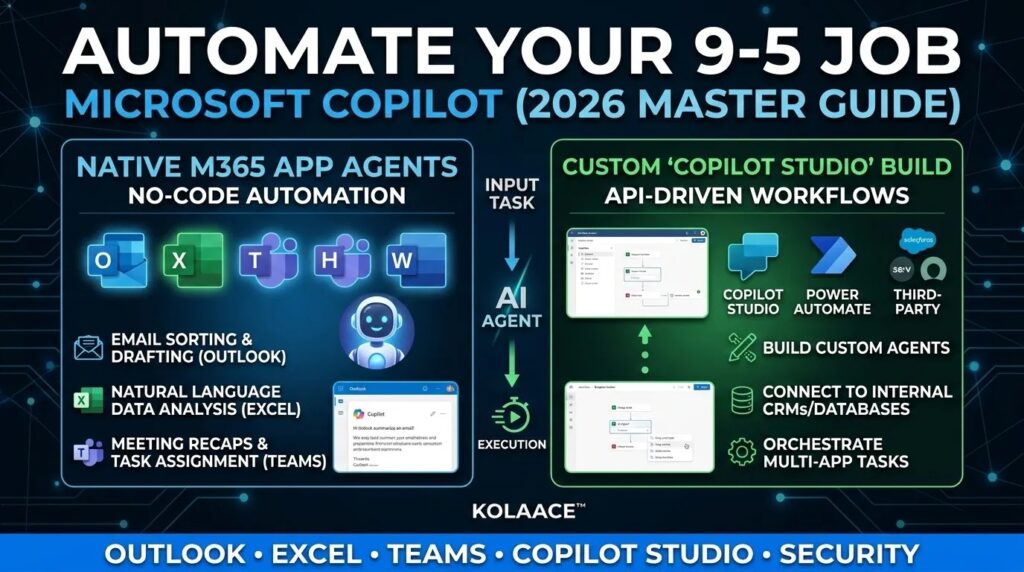
How to Automate Each App in 2026
1. Outlook: Automate Your Communication
Using the new March 2026 “Email Grounding” feature, Copilot now understands the history of every attachment and thread without you opening them.
- The “Catch Up” Command: “Summarize all emails from my manager this morning and highlight any requests involving the Q3 budget.”
- Auto-Drafting: Highlight bullet points and ask Copilot to “Make this a professional response based on my previous style.”
2. Excel: Agent Mode for Big Data
Forget complex formulas like VLOOKUP. In 2026, you use **Agent Mode** to speak to your data.
- The “Clean and Analyze” Prompt: “Identify all anomalies in this sales list, highlight them in red, and create a pivot table showing the top 5 regions.”
- Python Integration: Copilot runs internal scripts to generate predictive models without you needing to write code.
3. Teams: The Post-Meeting Automation
Never take notes again. Use the Copilot “Project Manager Agent” to handle the follow-up.
- Action Item Sync: “Draft a recap of this meeting, assign the mentioned tasks to the team in Microsoft Planner, and send a summary in Teams.”
— KOLAACE™ Productivity Lab
Final Verdict: The End of Busywork
Automating your 9-5 job isn’t about laziness; it’s about high-level efficiency. By mastering Microsoft Copilot in 2026, you aren’t just keeping up with the future—you’re leading it.