In 2026, the era of “searching” for flights is dead. We have entered the era of Agentic AI. Instead of spending hours comparing tabs on Expedia or Kayak, modern travelers are now deploying autonomous AI agents that don’t just suggest trips—they execute them.
Whether you are a Slim Profile looking for a curated wellness retreat in Bali or a Plus-Size Profile planning a high-comfort luxury cruise through the Mediterranean, setting up an AI agent is the single most important tech skill for the 2026 traveler. This guide covers everything from using built-in “Agent Modes” to building your own custom travel bot.
Why AI Agents are Dominating 2026 Travel
According to 2026 market data, over 80% of travelers now use some form of AI, with 52% willing to let an agent handle the entire booking process from flight to hotel. The friction of manual comparison has been replaced by Intent-Based Orchestration.
| Feature | 2024 Chatbots | 2026 AI Agents |
|---|---|---|
| Actionability | Suggests links only | Executes bookings & payments |
| Data Source | Static/Old datasets | Real-time API & Live Web Access |
| Personalization | Generic templates | Deep learning of user bio/history |
Market Growth: The Rise of Autonomous Travel
The “Agent Leap” has seen travel-related AI queries skyrocket. As we noted in our v-Commerce guide, convenience is now the primary currency.
Autonomous AI Travel Booking Volume (2024-2026)
*Total transaction value handled via AI Agents.*
How to Set Up Your AI Travel Agent (Step-by-Step)
Method 1: Using Google Gemini Live (Easiest)
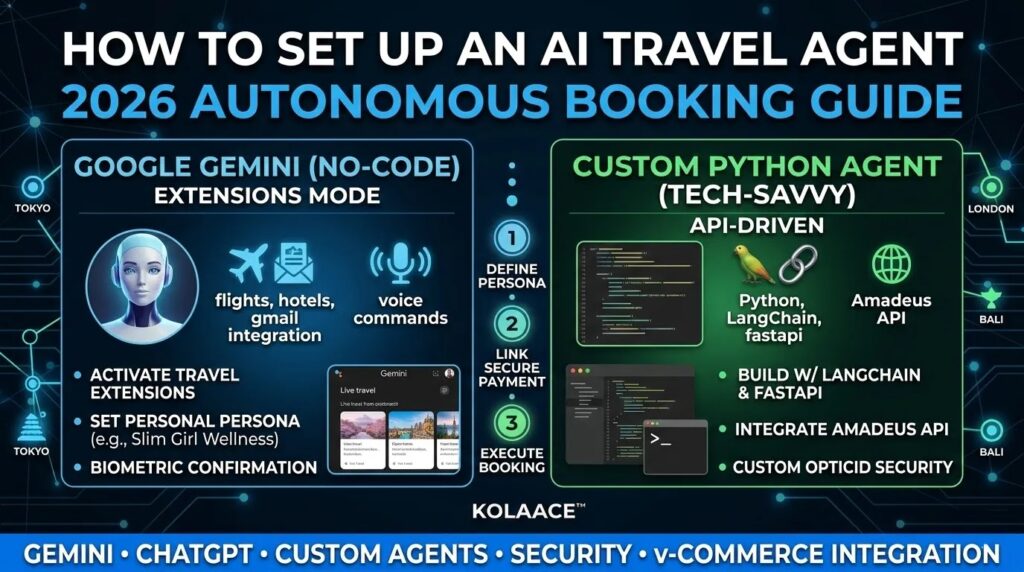
Google Gemini is now deeply integrated with Google Flights, Hotels, and Gmail. This is the “no-code” solution for most users.
- Activate Extensions: Go to Gemini Settings and ensure “Google Workspace,” “Google Maps,” and “Google Flights” are toggled ON.
- The Persona Prompt: Use a specific prompt: “You are my personal travel agent. Use my flight history from Gmail to suggest a 5-day trip to Tokyo that matches my preferred airline and budget.”
- Verification: Gemini will show you “live cards.” For Slim Profile, it can filter for boutique hotels with yoga studios; for Plus-Size Profile, it can prioritize hotels with extra-large accessible suites and high-rated room service.
Method 2: ChatGPT Agent Mode (The “Doer”)
In 2026, ChatGPT’s “Agent Mode” can actually navigate websites.
- Enable Agent Mode: Switch from “Chat” to “Agent” in the top toggle.
- Set Permissions: Connect your travel wallet or digital credit card for “Checkout Authorization.”
- Execute: Type “Book the cheapest business class flight to London for next Tuesday and reserve a table at Sketch at 8 PM.” The agent will open browser instances, fill out the forms, and pause only for your final biometric confirmation.
Method 3: Custom Python Agent (For Tech Enthusiasts)
For those who want total control without middle-man fees, building a custom agent using LangChain and FastAPI is the way to go.
Security & Privacy: The “Golden Rules” for 2026
- Use Virtual Cards: Never give an AI agent your primary debit card. Use a one-time virtual card (like Revolut or Privacy.com) with a set spending limit.
- Enable Multi-Factor Biometrics: Ensure your agent requires an OpticID (Vision Pro) or FaceID before the final “Pay” button is pressed.
- Audit Logs: Regularly check your “Agent Activity Log” to see which websites your AI has been visiting on your behalf.
— KOLAACE™ Travel Authority
Final Verdict: Automation is the New Luxury
The real luxury in 2026 isn’t a first-class seat; it’s the time saved not having to book it. By setting up your AI agent today, you’re joining the top 5% of efficient travelers.