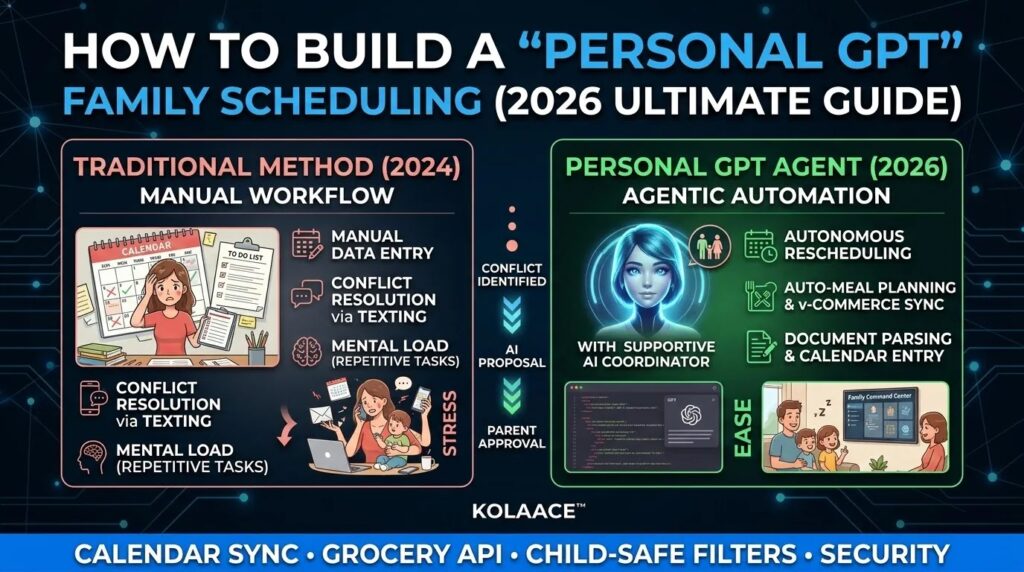
Most families do not struggle because they lack tools. They struggle because information is scattered. School notices sit in WhatsApp, office meetings live in calendars, grocery lists are written somewhere else, and nobody has a single clear view. This is where a Personal GPT for family scheduling becomes powerful. It does not just store events, it actively manages them.
In real use, this means fewer missed deadlines, fewer last minute arguments, and fewer forgotten responsibilities. After testing multiple setups in 2026, one thing is clear. A well configured family AI agent reduces mental load more than any traditional productivity app.
What is a Personal GPT for Family Scheduling
A Personal GPT is a custom AI assistant trained on your household’s routines, preferences, and responsibilities. Unlike a basic calendar app, it understands context.
- It knows that school exams are more important than social events
- It understands travel time between locations
- It can suggest alternatives when conflicts happen
- It can automate repetitive decisions like weekly groceries
Think of it as a digital family coordinator that works 24 by 7 without forgetting anything.
The Real Problem Families Face in 2026
Modern households are running like small organizations. The challenge is not planning, it is coordination.
| Task | Without AI | With Personal GPT |
|---|---|---|
| Schedule Conflicts | Manual calls and confusion | Auto suggestions with priorities |
| Daily Planning | Reactive decisions | Proactive reminders and adjustments |
| Information Tracking | Scattered across apps | Centralized knowledge system |
From practical experience, most time is lost not in doing tasks but in figuring out what to do next. This is exactly what a Personal GPT solves.
Step by Step Guide to Build Your Family GPT
Step 1: Define Role and Behavior
Start by clearly defining what your agent is responsible for. This step is often ignored, but it directly affects accuracy.
This ensures your GPT behaves consistently instead of giving random suggestions.
Step 2: Build the Knowledge Base
Your agent needs real data to work effectively. Upload structured information such as:
- School calendars and exam schedules
- Office timings and recurring meetings
- Medical appointments and reminders
- Diet preferences and grocery patterns
In testing, accuracy improves significantly when data is structured instead of scattered.
Step 3: Connect External Tools
This is where your GPT becomes functional instead of just informative.
- Connect Google Calendar or iCloud
- Integrate grocery apps or shopping carts
- Enable notifications via WhatsApp or email
Using APIs or automation tools ensures the agent can act, not just suggest.
Step 4: Set Approval Rules
Never allow full automation without control. Always define approval layers.
- Require confirmation before bookings
- Enable parental approval for child related changes
- Use biometric locks for payments
This prevents mistakes and builds trust in the system.
Real World Use Cases
Working Parents
The agent automatically detects meeting overlaps with school events and suggests rescheduling options in advance.
Joint Families
Multiple members can share responsibilities. The GPT assigns tasks like grocery shopping or bill payments based on availability.
Students and Tuition Planning
It balances study time, classes, and rest, ensuring no overload during exams.
Pros and Cons
Advantages
- Reduces mental load and decision fatigue
- Improves coordination across family members
- Saves time on repetitive planning tasks
- Provides proactive suggestions
Limitations
- Requires initial setup effort
- Depends on data accuracy
- Needs strict privacy controls
No system is perfect, but with proper setup, benefits clearly outweigh limitations.
Who Should Use This System
- Busy working professionals managing multiple responsibilities
- Families with school going children
- Households managing multiple schedules
Who Should Avoid It
- Individuals who prefer fully manual control
- Users uncomfortable with digital tools
Best Practices for Long Term Success
- Keep data updated weekly
- Review suggestions before approval
- Start with simple automation, then expand gradually
- Maintain privacy settings strictly
From real usage, gradual adoption works better than full automation from day one.
Conclusion
A Personal GPT for family scheduling is not a luxury anymore. It is becoming a practical solution for managing modern life. When set up correctly, it acts as a reliable system that keeps everything aligned.
The key is not complexity, but clarity. Define roles, connect data, and maintain control. Once these are in place, the system becomes one of the most useful tools in your daily routine.
Frequently Asked Questions